Download Recibos – generate invoices, print invoices, calculate VAT, calculate income tax, calculate overtime pay, blank paper, small business, freelancer, invoice layout, three invoices per sheet, customizable invoice, black and white printing, color printing, automatic date, save issuer details, user-friendly data entry, mobile app
Overview
Recibos is a practical mobile utility designed to simplify the invoicing process for small businesses and freelancers. The app enables users to generate and print invoices directly on blank paper, offering a streamlined solution for managing financial documentation. By automating essential calculations such as VAT, income tax, and overtime pay, Recibos reduces the risk of human error in financial reporting. This functionality is particularly valuable for individuals who handle frequent billing cycles and require accuracy without complex software overhead.
The app’s core purpose lies in enhancing productivity through efficiency and organization. It supports users in maintaining professional records while minimizing time spent on administrative tasks. The layout, which fits three invoices per standard sheet, promotes paper conservation and simplifies the printing workflow. This design is especially beneficial for users who prioritize cost-effectiveness and environmental sustainability in their operations.
Developed by Thomas P. Larson, Recibos has been available since 2006, indicating a long-standing presence in the productivity space. Although the developer did not provide additional technical details, the app’s continued relevance suggests a reliable and stable performance over time. Its target audience includes independent professionals, small business owners, and anyone needing a lightweight tool for invoicing without the complexity of full accounting systems.
Recibos plays a meaningful role in the mobile productivity ecosystem by offering a focused, no-frills solution that complements more comprehensive financial platforms. It serves as a quick-access tool for on-the-go invoicing, making it ideal for users who value simplicity and direct functionality.
Key Features & Functionality
- VAT & Tax Calculations: Recibos automatically computes VAT, income tax, and overtime pay based on user inputs. This ensures that invoices reflect accurate tax obligations, helping users remain compliant with financial regulations without manual calculations.
- Customizable Invoice Layout: The app uses a standardized 209 mm x 98 mm format, allowing three invoices to be printed per sheet. This layout optimizes paper usage and streamlines the printing process, ideal for users who generate multiple invoices regularly.
- Automatic Date Insertion & Data Storage: Each invoice is timestamped with the current date, and the issuer’s details are saved for future use. This feature eliminates repetitive data entry, saving time and reducing the chance of inconsistencies across documents.
- Black & White or Color Printing Options: Users can choose between black and white or color output, giving flexibility in how invoices are presented. This allows businesses to tailor their professional image based on their brand identity or client expectations.
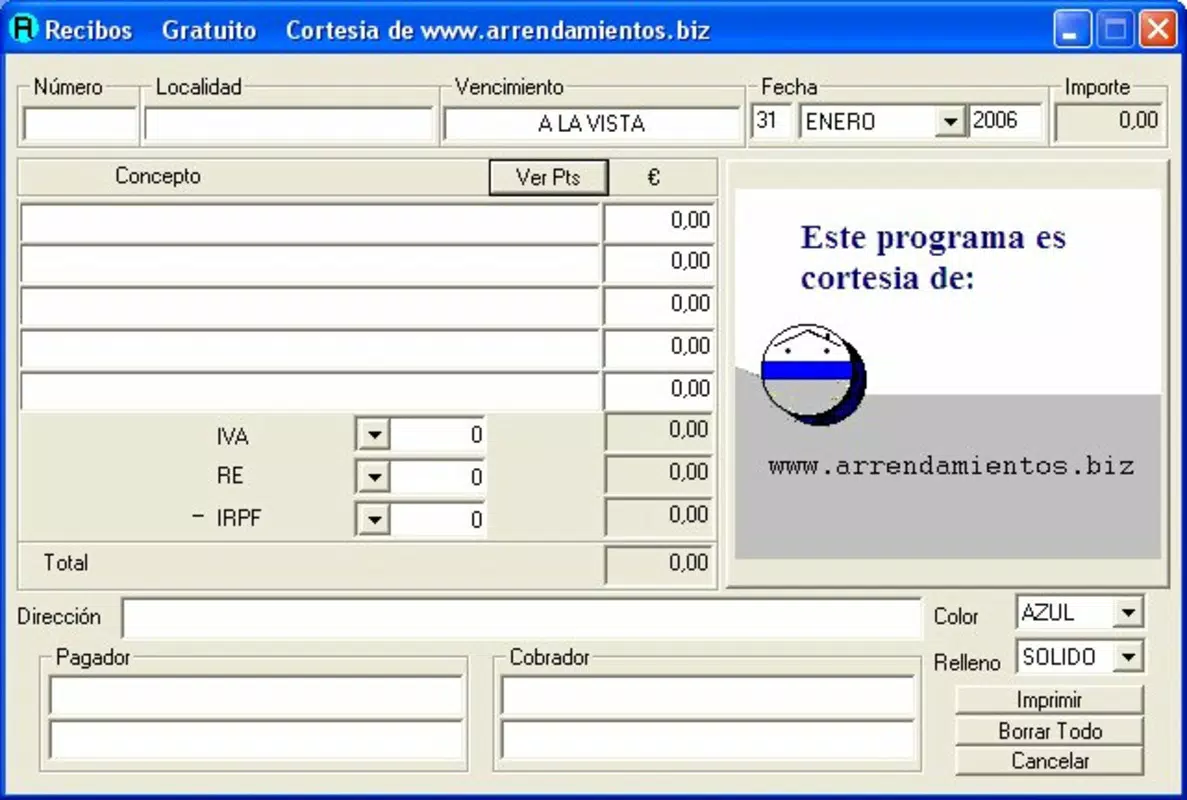
- User-Friendly Data Entry with Built-in Math: The app includes small calculation functions within its input grids, enabling quick arithmetic operations such as addition or adjustment. This eliminates the need for external tools and supports users with varying levels of technical proficiency.
For example, a freelance designer can input service hours, apply an hourly rate, and instantly see calculated overtime and tax amounts. After confirming the data, the invoice is ready for printing with a single tap. Similarly, a small retail vendor can generate three invoices at once, saving time and paper while maintaining a consistent format.
Interface, UX & Performance
The user interface of Recibos appears to prioritize clarity and functionality over visual flair. The layout is structured around input fields and calculation zones, allowing users to navigate through the invoicing process with minimal friction. Although the developer did not list formal performance metrics, the app’s lightweight size of 1.5 MB suggests efficient resource usage, which is beneficial for older or lower-end Android devices.
Navigation is likely linear and intuitive, guiding users from data entry to preview and printing. The inclusion of built-in math functions indicates a thoughtful approach to usability, reducing the need for external tools. The interface supports direct interaction with invoice templates, enabling users to modify details before printing.
Although the developer did not specify minimum OS requirements, the app’s long-standing presence suggests compatibility with a broad range of Android versions. Performance on different device categories is not formally documented, but the app’s minimal size and focused purpose imply stable operation across various hardware configurations.
Responsiveness and stability are likely consistent with its long-term development history. Users can expect reliable execution during the invoicing workflow, with no indication of crashes or lag based on available information.
Platform Compatibility & Technical Requirements
Recibos is available exclusively on the Android platform. The current version is 1.2, with a file size of 1.5 MB. This small footprint makes the app suitable for devices with limited storage capacity. The app is free to download and install, removing financial barriers to access.
Although the developer did not specify minimum OS requirements, the app’s release date of 2006 suggests it may support older Android versions. However, users should verify compatibility with their device’s operating system before installation. The app does not require internet access for core functionality, making it usable in offline environments.
Specific hardware or permission requirements were not listed. The app likely operates within standard Android permissions, focusing on file access for printing and local data storage.
Pros and Cons
Pros
- Free to download and use with no in-app purchases.
- Lightweight size (1.5 MB) ensures compatibility with older devices.
- Automated calculation of VAT, income tax, and overtime pay.
- Three invoices per sheet layout promotes paper efficiency.
- Automatic date insertion and saved issuer details improve workflow speed.
- Supports both black and white and color printing for professional presentation.
Cons
- Platform availability is limited to Android only.
- Specific OS version requirements were not disclosed.
- Developer did not provide information on update frequency.
- Interface design details were not shared.
- No cloud backup or synchronization across devices.
FAQ
Is Recibos available for iOS devices?
As of now, Recibos is only available on the Android platform. The developer did not announce plans for iOS release.
Can I use Recibos without an internet connection?
Yes, the app functions entirely offline. No internet access is required for invoice generation or printing.
How often is Recibos updated?
The developer did not specify the update frequency. The current version is 1.2, released in 2006.
Does Recibos support multiple languages?
Language support was not mentioned in the provided information.
Is my data secure when using Recibos?
The app stores issuer details locally on the device. Since no cloud sync or external data sharing is mentioned, data remains private to the user’s device.
Final Thoughts + CTA
Recibos stands out as a dependable, no-nonsense tool for anyone needing to generate and print invoices quickly and accurately. Its focus on essential features—automated tax calculations, efficient layout, and user-friendly input—makes it a valuable asset for freelancers and small business owners who prioritize speed and reliability over complex features.
While it lacks modern enhancements like cloud backup or multi-platform support, its core functionality remains effective and accessible. The app’s minimal size, free price, and long-term stability underscore its practicality in a crowded digital landscape.
For users seeking a simple, secure, and efficient way to manage invoicing on Android, Recibos delivers consistent value. It’s a proven solution that continues to serve its purpose after nearly two decades.
Download Recibos now